CSS3实现莲花绽放的动画效果
作者:互联网
2026-03-30
 HTML教程
先来看效果:
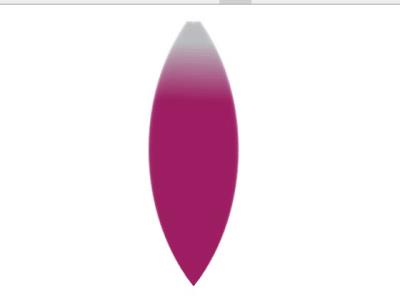
这效果看起来挺炫,但原理并不复杂,能实现一片花瓣动起来,就能实现9片花瓣。效果的叠加而已。
HTML:
CSS:
View Code body { background-color: #000;} .demo { margin:0px auto; width: 500px;}/*莲花花瓣的容器*/.box { position: relative;/*设置相对定位,因为花瓣都要进行绝对定位*/ height: 400px; margin-top:400px}/*花瓣进行绝对定位*/.box .leaf { position: absolute;}/*绘制莲花花瓣*/.leaf { margin-top:0px; width: 200px; height: 200px; border-radius: 200px 0px;/*制作花瓣角*/ background: -moz-linear-gradient(45deg,rgba(188,190,192,1) 8%,rgba(158,31,99,1) 30%,rgba(158,31,99,1) 100%);/*制作花瓣颜色*/ background: -webkit-linear-gradient(45deg,rgba(188,190,192,1) 8%,rgba(158,31,99,1) 30%,rgba(158,31,99,1) 100%);/*制作花瓣颜色*/ opacity: .6; filter:alpha(opacity=50); transform: rotate(135deg);/*花瓣旋转135deg*/ transform-origin: top right;/*重置花瓣旋转原点,这个很重要*/}@keyframes show-2 { 0% { transform: rotate(135deg); } 50% { transform: rotate(45deg); } 100%{ transform: rotate(135deg); }}@keyframes show-3 { 0% { transform: rotate(135deg); } 50% { transform: rotate(65deg); } 100%{ transform: rotate(135deg); }}@keyframes show-4 { 0% { transform: rotate(135deg); } 50% { transform: rotate(85deg); } 100%{ transform: rotate(135deg); }}@keyframes show-5 { 0% { transform: rotate(135deg); } 50% { transform: rotate(105deg); } 100%{ transform: rotate(135deg); }}@keyframes show-6 { 0% { transform: rotate(135deg); } 50% { transform: rotate(165deg); } 100%{ transform: rotate(135deg); }}@keyframes show-7 { 0% { transform: rotate(135deg); } 50% { transform: rotate(185deg); } 100%{ transform: rotate(135deg); }}@keyframes show-8 { 0% { transform: rotate(135deg); } 50% { transform: rotate(205deg); } 100%{ transform: rotate(135deg); }} @keyframes show-9 { 0% { transform: rotate(135deg); } 50% { transform: rotate(225deg); } 100%{ transform: rotate(135deg); }} .leaf:nth-child(1) { background: -moz-linear-gradient(45deg,rgba(250,250,250,1) 8%,rgba(158,31,99,1) 30%,rgba(158,31,99,1) 100%);/*制作花瓣颜色*/}.leaf:nth-child(2) { animation: show-2 6s ease-in-out infinite;}.leaf:nth-child(3) { animation: show-3 6s ease-in-out infinite;}.leaf:nth-child(4) { animation: show-4 6s ease-in-out infinite;}.leaf:nth-child(5) { animation: show-5 6s ease-in-out infinite;}.leaf:nth-child(6) { animation: show-6 6s ease-in-out infinite;}.leaf:nth-child(7) { animation: show-7 6s ease-in-out infinite;}.leaf:nth-child(8) { animation: show-8 6s ease-in-out infinite;}.leaf:nth-child(9) { animation: show-9 6s ease-in-out infinite;}以上就是CSS3实现莲花绽放得动画效果的详细内容,更多关于CSS3 莲花绽放动画的资料请关注本站其它相关文章!
相关推荐