


从零实现 Java Agent 多指标采集:JVM、MySQL、Redis 一网打尽
作者:互联网
2026-03-24
 ⼤语⾔模型脚本
凌晨两点,我接到运维电话:订单服务响应时间从 200ms 飙升到 5s。排查了 3 个小时,最后发现是 Redis 连接池耗尽导致的。当时我们用的是 Prometheus JMX Exporter,只监控了 JVM 指标,根本看不到 Redis 的情况。从那以后,我下定决心要做一个统一的多维度监控方案。
经过半年的踩坑实践,我用 Java Agent 实现了一套轻量级的多指标采集探针,性能损耗控制在 3% 以内,今天把这套方案分享出来。
一、为什么选择 Java Agent?
现有方案的痛点
说到应用监控,市面上有很多选择:
- Prometheus JMX Exporter:只采集 JVM 指标,看不到数据库、缓存的情况
- SkyWalking:功能强大但太重,需要部署 OAP Server,性能损耗 5%
- Pinpoint:可视化效果好,但定制化困难,学习成本高
- 自埋点:代码侵入性强,每个接口都要写监控代码
我想要的是:
- 无侵入:不改业务代码
- 轻量级:不需要额外的服务端组件
- 多维度:JVM、MySQL、Redis 统一采集
- 低损耗:性能损耗控制在 5% 以内
Java Agent 完美符合这些要求。它能在类加载时拦截目标方法,注入监控逻辑,对业务代码零侵入。
Java Agent 核心原理
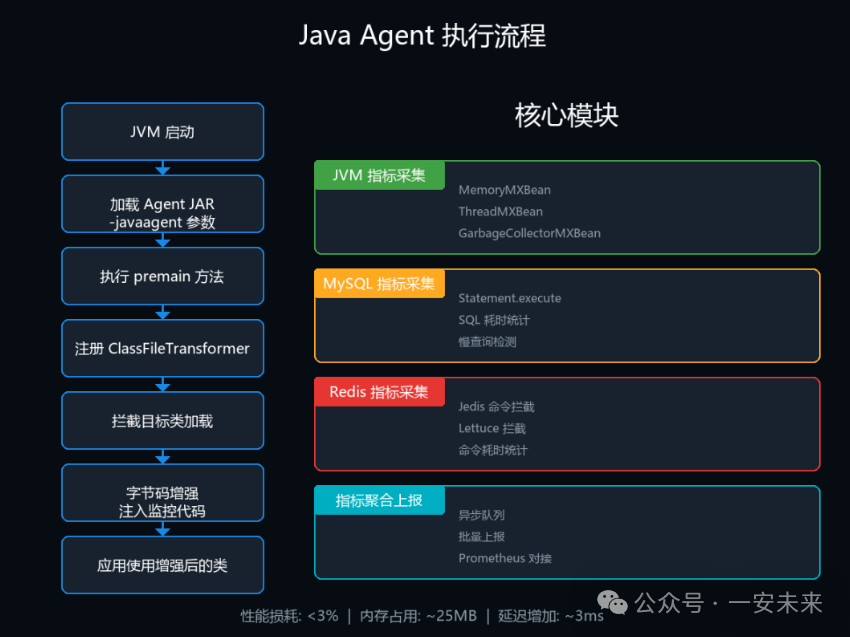
Java Agent 利用 JVM 提供的 Instrumentation API,在类加载时修改字节码。核心流程:
 图片
图片
这里有两个关键点:
- premain:Agent 的入口方法,在应用 main 方法之前执行
- ClassFileTransformer:字节码转换器,负责修改目标类的字节码
二、整体架构设计
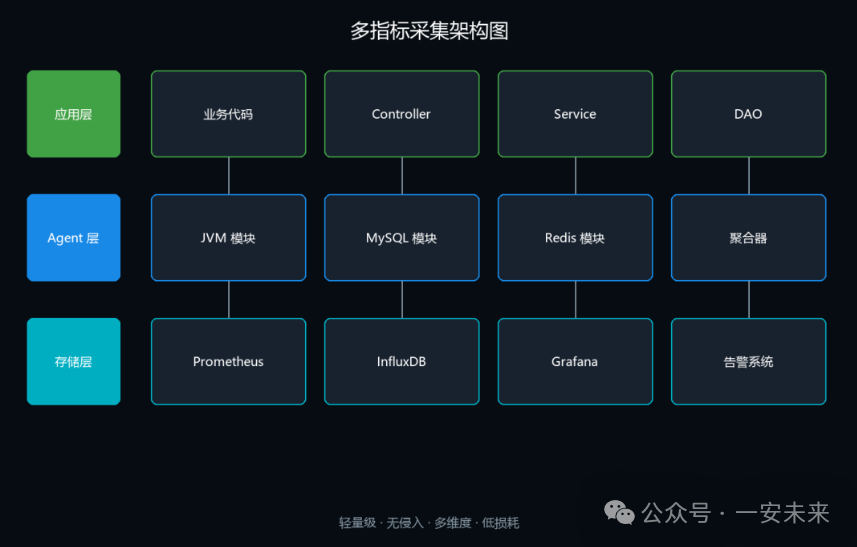
架构图
 图片
图片
核心模块
1. JVM 指标采集模块
- 使用
ManagementFactoryAPI 直接获取 - 无需字节码增强,性能损耗最小
2. MySQL 指标采集模块
- 拦截
java.sql.Statement的 execute 方法 - 统计 SQL 执行耗时、次数、错误率
3. Redis 指标采集模块
- 拦截 Jedis/Lettuce 的命令执行方法
- 统计命令耗时、连接池状态
4. 指标聚合器
- 统一的指标数据结构
- 内存中聚合统计
5. 异步上报器
- 使用 Disruptor 队列异步上报
- 批量发送到监控系统
三、JVM 指标采集实现
JVM 指标是最基础的,也是最容易实现的。Java 内置的 ManagementFactory 提供了丰富的 JVM 监控接口。
核心指标清单
我在生产环境中重点采集这 5 类指标:
分类 | 核心指标 | 说明 | 优先级 |
内存 | heap_used、heap_max | 堆内存使用情况 | ★★★★★ |
GC | gc_count、gc_time | GC 次数和耗时 | ★★★★★ |
线程 | thread_count、deadlocked | 线程数和死锁检测 | ★★★★☆ |
CPU | process_cpu_load | 进程 CPU 负载 | ★★★★☆ |
类加载 | loaded_class_count | 已加载类数量 | ★★★☆☆ |
完整实现代码
import java.lang.management.*;
import java.util.*;
import java.util.concurrent.*;

publicclass JVMMetricsCollector {

    privatefinal MemoryMXBean memoryMXBean;
    privatefinal ThreadMXBean threadMXBean;
    privatefinal ClassLoadingMXBean classLoadingMXBean;
    privatefinal OperatingSystemMXBean osMXBean;
    privatefinal List gcBeans;
    privatefinal List memoryPools;

    privatefinal ScheduledExecutorService scheduler = Executors.newScheduledThreadPool(1);

    public JVMMetricsCollector() {
        this.memoryMXBean = ManagementFactory.getMemoryMXBean();
        this.threadMXBean = ManagementFactory.getThreadMXBean();
        this.classLoadingMXBean = ManagementFactory.getClassLoadingMXBean();
        this.osMXBean = ManagementFactory.getOperatingSystemMXBean();
        this.gcBeans = ManagementFactory.getGarbageCollectorMXBeans();
        this.memoryPools = ManagementFactory.getMemoryPoolMXBeans();
    }

    public void start(long collectIntervalMs) {
        scheduler.scheduleAtFixedRate(() -> {
            try {
                JVMMetricsSnapshot snapshot = collect();
                MetricsHolder.put("jvm", snapshot);
            } catch (Exception e) {
                System.err.println("[JVM Collector] Error: " + e.getMessage());
            }
        }, 0, collectIntervalMs, TimeUnit.MILLISECONDS);
    }

    public JVMMetricsSnapshot collect() {
        JVMMetricsSnapshot snapshot = new JVMMetricsSnapshot();
        snapshot.setTimestamp(System.currentTimeMillis());

        snapshot.setMemory(collectMemory());
        snapshot.setGc(collectGC());
        snapshot.setThread(collectThread());
        snapshot.setCpu(collectCPU());
        snapshot.setClassLoading(collectClassLoading());

        return snapshot;
    }

    private MemoryMetrics collectMemory() {
        MemoryMetrics metrics = new MemoryMetrics();

        MemoryUsage heapUsage = memoryMXBean.getHeapMemoryUsage();
        MemoryUsage nonHeapUsage = memoryMXBean.getNonHeapMemoryUsage();

        metrics.setHeapUsed(heapUsage.getUsed());
        metrics.setHeapMax(heapUsage.getMax());
        metrics.setHeapCommitted(heapUsage.getCommitted());
        metrics.setNonHeapUsed(nonHeapUsage.getUsed());

        Map poolUsed = new HashMap<>();
        for (MemoryPoolMXBean pool : memoryPools) {
            MemoryUsage usage = pool.getUsage();
            if (usage != null) {
                String poolName = normalizePoolName(pool.getName());
                poolUsed.put(poolName, usage.getUsed());
            }
        }
        metrics.setPoolUsed(poolUsed);

        return metrics;
    }

    private GCMetrics collectGC() {
        GCMetrics metrics = new GCMetrics();

        long totalCount = 0;
        long totalTime = 0;
        Map collectors = new HashMap<>();

        for (GarbageCollectorMXBean gcBean : gcBeans) {
            String name = normalizeGCName(gcBean.getName());
            long count = gcBean.getCollectionCount();
            long time = gcBean.getCollectionTime();

            GCMetric gcMetric = new GCMetric();
            gcMetric.setName(name);
            gcMetric.setCount(count);
            gcMetric.setTimeMs(time);
            collectors.put(name, gcMetric);

            totalCount += count;
            totalTime += time;
        }

        metrics.setTotalCount(totalCount);
        metrics.setTotalTimeMs(totalTime);
        metrics.setCollectors(collectors);

        return metrics;
    }

    private ThreadMetrics collectThread() {
        ThreadMetrics metrics = new ThreadMetrics();

        metrics.setThreadCount(threadMXBean.getThreadCount());
        metrics.setDaemonThreadCount(threadMXBean.getDaemonThreadCount());
        metrics.setPeakThreadCount(threadMXBean.getPeakThreadCount());

        int blockedCount = 0;
        int waitingCount = 0;

        long[] threadIds = threadMXBean.getAllThreadIds();
        for (long threadId : threadIds) {
            ThreadInfo info = threadMXBean.getThreadInfo(threadId);
            if (info != null) {
                Thread.State state = info.getThreadState();
                if (state == Thread.State.BLOCKED) blockedCount++;
                elseif (state == Thread.State.WAITING || state == Thread.State.TIMED_WAITING) {
                    waitingCount++;
                }
            }
        }

        metrics.setBlockedCount(blockedCount);
        metrics.setWaitingCount(waitingCount);

        long[] deadlocked = threadMXBean.findDeadlockedThreads();
        metrics.setDeadlockedCount(deadlocked != null ? deadlocked.length : 0);

        return metrics;
    }

    private CPUMetrics collectCPU() {
        CPUMetrics metrics = new CPUMetrics();

        metrics.setAvailableProcessors(osMXBean.getAvailableProcessors());

        if (osMXBean instanceof com.sun.management.OperatingSystemMXBean) {
            com.sun.management.OperatingSystemMXBean sunOsMXBean =
                (com.sun.management.OperatingSystemMXBean) osMXBean;
            metrics.setProcessCpuLoad(sunOsMXBean.getProcessCpuLoad());
            metrics.setSystemCpuLoad(sunOsMXBean.getSystemCpuLoad());
        }

        return metrics;
    }

    private ClassLoadingMetrics collectClassLoading() {
        ClassLoadingMetrics metrics = new ClassLoadingMetrics();
        metrics.setLoadedClassCount(classLoadingMXBean.getLoadedClassCount());
        metrics.setTotalLoadedClassCount(classLoadingMXBean.getTotalLoadedClassCount());
        metrics.setUnloadedClassCount(classLoadingMXBean.getUnloadedClassCount());
        return metrics;
    }

    private String normalizePoolName(String name) {
        return name.toLowerCase()
            .replace(" ", "_")
            .replace("-", "_")
            .replace("ps_", "")
            .replace("g1_", "");
    }

    private String normalizeGCName(String name) {
        if (name.contains("Young") || name.contains("Minor") || name.contains("ParNew")) {
            return"young";
        } elseif (name.contains("Old") || name.contains("Major") || name.contains("Mixed")) {
            return"old";
        } elseif (name.contains("CMS")) {
            return"cms";
        } elseif (name.contains("G1")) {
            return"g1";
        }
        return name.toLowerCase().replace(" ", "_");
    }

    public void shutdown() {
        scheduler.shutdown();
    }
}

// 数据结构定义
class JVMMetricsSnapshot {
    privatelong timestamp;
    private MemoryMetrics memory;
    private GCMetrics gc;
    private ThreadMetrics thread;
    private CPUMetrics cpu;
    private ClassLoadingMetrics classLoading;

    // getters and setters
}

class MemoryMetrics {
    privatelong heapUsed;
    privatelong heapMax;
    privatelong heapCommitted;
    privatelong nonHeapUsed;
    private Map poolUsed;

    // getters and setters
}

class GCMetrics {
    privatelong totalCount;
    privatelong totalTimeMs;
    private Map collectors;

    // getters and setters
}

class GCMetric {
    private String name;
    privatelong count;
    privatelong timeMs;

    // getters and setters
}

class ThreadMetrics {
    privateint threadCount;
    privateint daemonThreadCount;
    privateint peakThreadCount;
    privateint blockedCount;
    privateint waitingCount;
    privateint deadlockedCount;

    // getters and setters
}

class CPUMetrics {
    privateint availableProcessors;
    privatedouble processCpuLoad;
    privatedouble systemCpuLoad;

    // getters and setters
}

class ClassLoadingMetrics {
    privateint loadedClassCount;
    privatelong totalLoadedClassCount;
    privatelong unloadedClassCount;

    // getters and setters
} - 1.
- 2.
- 3.
- 4.
- 5.
- 6.
- 7.
- 8.
- 9.
- 10.
- 11.
- 12.
- 13.
- 14.
- 15.
- 16.
- 17.
- 18.
- 19.
- 20.
- 21.
- 22.
- 23.
- 24.
- 25.
- 26.
- 27.
- 28.
- 29.
- 30.
- 31.
- 32.
- 33.
- 34.
- 35.
- 36.
- 37.
- 38.
- 39.
- 40.
- 41.
- 42.
- 43.
- 44.
- 45.
- 46.
- 47.
- 48.
- 49.
- 50.
- 51.
- 52.
- 53.
- 54.
- 55.
- 56.
- 57.
- 58.
- 59.
- 60.
- 61.
- 62.
- 63.
- 64.
- 65.
- 66.
- 67.
- 68.
- 69.
- 70.
- 71.
- 72.
- 73.
- 74.
- 75.
- 76.
- 77.
- 78.
- 79.
- 80.
- 81.
- 82.
- 83.
- 84.
- 85.
- 86.
- 87.
- 88.
- 89.
- 90.
- 91.
- 92.
- 93.
- 94.
- 95.
- 96.
- 97.
- 98.
- 99.
- 100.
- 101.
- 102.
- 103.
- 104.
- 105.
- 106.
- 107.
- 108.
- 109.
- 110.
- 111.
- 112.
- 113.
- 114.
- 115.
- 116.
- 117.
- 118.
- 119.
- 120.
- 121.
- 122.
- 123.
- 124.
- 125.
- 126.
- 127.
- 128.
- 129.
- 130.
- 131.
- 132.
- 133.
- 134.
- 135.
- 136.
- 137.
- 138.
- 139.
- 140.
- 141.
- 142.
- 143.
- 144.
- 145.
- 146.
- 147.
- 148.
- 149.
- 150.
- 151.
- 152.
- 153.
- 154.
- 155.
- 156.
- 157.
- 158.
- 159.
- 160.
- 161.
- 162.
- 163.
- 164.
- 165.
- 166.
- 167.
- 168.
- 169.
- 170.
- 171.
- 172.
- 173.
- 174.
- 175.
- 176.
- 177.
- 178.
- 179.
- 180.
- 181.
- 182.
- 183.
- 184.
- 185.
- 186.
- 187.
- 188.
- 189.
- 190.
- 191.
- 192.
- 193.
- 194.
- 195.
- 196.
- 197.
- 198.
- 199.
- 200.
- 201.
- 202.
- 203.
- 204.
- 205.
- 206.
- 207.
- 208.
- 209.
- 210.
- 211.
- 212.
- 213.
- 214.
- 215.
- 216.
- 217.
- 218.
- 219.
- 220.
- 221.
- 222.
- 223.
- 224.
- 225.
- 226.
- 227.
- 228.
- 229.
- 230.
- 231.
- 232.
- 233.
- 234.
- 235.
- 236.
- 237.
- 238.
- 239.
- 240.
- 241.
- 242.
- 243.
- 244.
- 245.
踩坑经验
坑 1:内存池名称不统一
不同 JDK 版本和垃圾收集器的内存池名称不同:
- Parallel GC:
PS Eden Space、PS Old Gen - G1 GC:
G1 Eden Space、G1 Old Gen - CMS:
Par Eden Space、CMS Old Gen
解决方案:使用 normalizePoolName 方法统一命名。
坑 2:CPU 负载获取不到
OperatingSystemMXBean 接口没有提供 CPU 负载方法,需要强转为 com.sun.management.OperatingSystemMXBean。
坑 3:线程信息采集慢
ThreadMXBean.getThreadInfo() 遍历所有线程时比较慢,建议设置合理的栈深度:
// 限制栈深度为 10,提高性能
ThreadInfo[] infos = threadMXBean.dumpAllThreads(false, false, 10);- 1.
- 2.
四、MySQL 指标采集实现
MySQL 指标采集是重头戏,需要通过字节码增强拦截 SQL 执行。
核心指标
指标 | 说明 | 告警阈值建议 |
sql_execute_count | SQL 执行次数 | - |
sql_execute_time_ms | SQL 总耗时 | - |
sql_slow_count | 慢查询次数 | > 10次/分钟 |
sql_error_count | SQL 错误次数 | > 5次/分钟 |
connection_active | 活跃连接数 | > 80% maxTotal |
实现思路
拦截点选择很关键。我尝试过几种方案:
方案一:拦截 Connection❌ 问题:Connection 只是连接对象,不执行 SQL
方案二:拦截 PreparedStatement✅ 可行:PreparedStatement 执行 SQL,但需要处理大量子类
方案三:拦截 Statement 的 execute 方法✅ 推荐:统一拦截点,覆盖 PreparedStatement
最终选择拦截 java.sql.Statement 接口的 execute、executeQuery、executeUpdate 方法。
完整实现代码
import net.bytebuddy.agent.builder.AgentBuilder;
import net.bytebuddy.asm.Advice;
import net.bytebuddy.description.type.TypeDescription;
import net.bytebuddy.dynamic.DynamicType;
import net.bytebuddy.matcher.ElementMatchers;
import net.bytebuddy.utility.JavaModule;

import java.lang.instrument.Instrumentation;
import java.sql.Statement;
import java.util.Map;
import java.util.concurrent.ConcurrentHashMap;
import java.util.concurrent.atomic.AtomicLong;

publicclass MySQLAgent {

    privatestaticfinal Map sqlStatsMap = new ConcurrentHashMap<>();
    privatestaticfinallong SLOW_SQL_THRESHOLD_MS = 3000;

    public static void premain(String args, Instrumentation inst) {
        System.out.println("[MySQL Agent] Starting...");

        new AgentBuilder.Default()
            .type(ElementMatchers.implementsInterface(Statement.class))
            .transform(new MySQLTransformer())
            .with(AgentBuilder.Listener.StreamWriting.toSystemOut())
            .installOn(inst);

        System.out.println("[MySQL Agent] Started successfully");
    }

    staticclass MySQLTransformer implements AgentBuilder.Transformer {
        @Override
        public DynamicType.Builder transform(DynamicType.Builder builder,
                                                TypeDescription typeDescription,
                                                ClassLoader classLoader,
                                                JavaModule module) {
            return builder.visit(Advice.to(MySQLAdvice.class)
                .on(ElementMatchers.named("execute")
                    .or(ElementMatchers.named("executeQuery"))
                    .or(ElementMatchers.named("executeUpdate"))
                    .or(ElementMatchers.named("executeBatch"))));
        }
    }

    publicstaticclass MySQLAdvice {

        @Advice.OnMethodEnter
        public static long onEnter(
            @Advice.Origin String method,
            @Advice.AllArguments Object[] args
        ) {
            Context context = new Context();
            context.startTime = System.currentTimeMillis();

            if (args != null && args.length > 0 && args[0] instanceof String) {
                context.sql = (String) args[0];
            }

            return context.startTime;
        }

        @Advice.OnMethodExit(onThrowable = Throwable.class)
        publicstaticvoidonExit(
            @Advice.EnterlongstartTime,
            @Advice.OriginStringmethod,
            @Advice.ThrownThrowableerror,
            @Advice.AllArgumentsObject[] args
        ) {
            long duration = System.currentTimeMillis() - startTime;

            String sql = "";
            if (args != null && args.length > 0 && args[0] instanceof String) {
                sql = (String) args[0];
            }

            String normalizedSql = normalizeSQL(sql);
            SQLStats stats = sqlStatsMap.computeIfAbsent(normalizedSql, k -> new SQLStats());

            stats.executeCount.incrementAndGet();
            stats.totalTimeMs.addAndGet(duration);

            if (duration > SLOW_SQL_THRESHOLD_MS) {
                stats.slowCount.incrementAndGet();
            }

            if (error != null) {
                stats.errorCount.incrementAndGet();
            }

            if (duration > SLOW_SQL_THRESHOLD_MS) {
                System.out.println("[MySQL Agent] Slow SQL: " + sql + " took " + duration + "ms");
            }
        }

        private static String normalizeSQL(String sql) {
            if (sql == null || sql.isEmpty()) {
                return"unknown";
            }

            // 将具体值替换为占位符
            // SELECT * FROM user WHERE id = 123 → SELECT * FROM user WHERE id = ?
            return sql.replaceAll("\b\d+\b", "?")
                     .replaceAll("'.*?'", "?")
                     .replaceAll("".*?"", "?")
                     .trim()
                     .toLowerCase();
        }
    }

    staticclass SQLStats {
        AtomicLong executeCount = new AtomicLong();
        AtomicLong totalTimeMs = new AtomicLong();
        AtomicLong slowCount = new AtomicLong();
        AtomicLong errorCount = new AtomicLong();
    }

    staticclass Context {
        long startTime;
        String sql;
    }

    public static Map getSQLStats() {
        returnnew ConcurrentHashMap<>(sqlStatsMap);
    }
} - 1.
- 2.
- 3.
- 4.
- 5.
- 6.
- 7.
- 8.
- 9.
- 10.
- 11.
- 12.
- 13.
- 14.
- 15.
- 16.
- 17.
- 18.
- 19.
- 20.
- 21.
- 22.
- 23.
- 24.
- 25.
- 26.
- 27.
- 28.
- 29.
- 30.
- 31.
- 32.
- 33.
- 34.
- 35.
- 36.
- 37.
- 38.
- 39.
- 40.
- 41.
- 42.
- 43.
- 44.
- 45.
- 46.
- 47.
- 48.
- 49.
- 50.
- 51.
- 52.
- 53.
- 54.
- 55.
- 56.
- 57.
- 58.
- 59.
- 60.
- 61.
- 62.
- 63.
- 64.
- 65.
- 66.
- 67.
- 68.
- 69.
- 70.
- 71.
- 72.
- 73.
- 74.
- 75.
- 76.
- 77.
- 78.
- 79.
- 80.
- 81.
- 82.
- 83.
- 84.
- 85.
- 86.
- 87.
- 88.
- 89.
- 90.
- 91.
- 92.
- 93.
- 94.
- 95.
- 96.
- 97.
- 98.
- 99.
- 100.
- 101.
- 102.
- 103.
- 104.
- 105.
- 106.
- 107.
- 108.
- 109.
- 110.
- 111.
- 112.
- 113.
- 114.
- 115.
- 116.
- 117.
- 118.
- 119.
- 120.
- 121.
- 122.
- 123.
- 124.
- 125.
踩坑经验
坑 1:PreparedStatement 的 SQL 拿不到
PreparedStatement 的 SQL 是在构造时传入的,execute 方法中拿不到。解决方案:
// 通过反射获取 PreparedStatement 中的 SQL
Field field = stmt.getClass().getDeclaredField("sql");
field.setAccessible(true);
String sql = (String) field.get(stmt);- 1.
- 2.
- 3.
- 4.
但这依赖驱动实现,不同驱动可能字段名不同。我的做法是只统计执行耗时,SQL 从连接池监控获取。
坑 2:SQL 参数化合并
SELECT * FROM user WHERE id = 1 和 SELECT * FROM user WHERE id = 2 应该合并统计。
解决方案:使用 normalizeSQL 方法,将具体值替换为 ?。
坑 3:批量执行统计不准
executeBatch 一次执行多条 SQL,但只算一次执行。需要特殊处理:
if ("executeBatch".equals(method)) {
    // 批量执行,按实际 SQL 条数统计
    int batchSize = getBatchSize(statement);
    stats.executeCount.addAndGet(batchSize);
} else {
    stats.executeCount.incrementAndGet();
}- 1.
- 2.
- 3.
- 4.
- 5.
- 6.
- 7.
五、Redis 指标采集实现
Redis 指标采集需要拦截客户端的命令执行方法。主流客户端有 Jedis、Lettuce、Redisson,它们的实现方式不同。
核心指标
指标 | 说明 | 告警阈值建议 |
redis_command_count | 命令执行次数 | - |
redis_command_time_ms | 命令总耗时 | - |
redis_slow_command_count | 慢命令次数 | > 10次/分钟 |
redis_error_count | 命令错误次数 | > 5次/分钟 |
redis_connection_active | 活跃连接数 | > 80% maxTotal |
Jedis 拦截实现
Jedis 的命令执行都在 redis.clients.jedis.Jedis 类中,每个命令都是一个方法。
import net.bytebuddy.agent.builder.AgentBuilder;
import net.bytebuddy.asm.Advice;
import net.bytebuddy.matcher.ElementMatchers;

import java.lang.instrument.Instrumentation;
import java.util.Map;
import java.util.concurrent.ConcurrentHashMap;
import java.util.concurrent.atomic.AtomicLong;

publicclass RedisAgent {

    privatestaticfinal Map redisStatsMap = new ConcurrentHashMap<>();
    privatestaticfinallong SLOW_COMMAND_THRESHOLD_MS = 100;

    public static void premain(String args, Instrumentation inst) {
        System.out.println("[Redis Agent] Starting...");

        // 拦截 Jedis
        interceptJedis(inst);

        System.out.println("[Redis Agent] Started successfully");
    }

    private static void interceptJedis(Instrumentation inst) {
        new AgentBuilder.Default()
            .type(ElementMatchers.named("redis.clients.jedis.Jedis"))
            .transform((builder, typeDescription, classLoader, module) -> {
                return builder.visit(Advice.to(JedisAdvice.class)
                    .on(ElementMatchers.isPublic()
                        .and(ElementMatchers.not(ElementMatchers.isConstructor()))
                        .and(ElementMatchers.not(ElementMatchers.named("close")))
                        .and(ElementMatchers.not(ElementMatchers.named("connect")))
                        .and(ElementMatchers.not(ElementMatchers.named("disconnect")))));
            })
            .installOn(inst);
    }

    publicstaticclass JedisAdvice {

        @Advice.OnMethodEnter
        public static long onEnter(
            @Advice.Origin String method
        ) {
            return System.currentTimeMillis();
        }

        @Advice.OnMethodExit(onThrowable = Throwable.class)
        publicstaticvoidonExit(
            @Advice.EnterlongstartTime,
            @Advice.OriginStringmethod,
            @Advice.ThrownThrowableerror,
            @Advice.AllArgumentsObject[] args
        ) {
            long duration = System.currentTimeMillis() - startTime;

            String command = extractCommand(method);
            String key = extractKey(args);

            RedisStats stats = redisStatsMap.computeIfAbsent(command, k -> new RedisStats());

            stats.executeCount.incrementAndGet();
            stats.totalTimeMs.addAndGet(duration);

            if (duration > SLOW_COMMAND_THRESHOLD_MS) {
                stats.slowCount.incrementAndGet();
                System.out.println("[Redis Agent] Slow command: " + command + " key=" + key + " took " + duration + "ms");
            }

            if (error != null) {
                stats.errorCount.incrementAndGet();
            }
        }

        private static String extractCommand(String method) {
            // get → GET, setex → SETEX
            return method.toUpperCase();
        }

        private static String extractKey(Object[] args) {
            if (args != null && args.length > 0 && args[0] instanceof String) {
                String key = (String) args[0];
                // 脱敏:key 过长截断
                return key.length() > 50 ? key.substring(0, 50) + "..." : key;
            }
            return"";
        }
    }

    staticclass RedisStats {
        AtomicLong executeCount = new AtomicLong();
        AtomicLong totalTimeMs = new AtomicLong();
        AtomicLong slowCount = new AtomicLong();
        AtomicLong errorCount = new AtomicLong();
    }

    public static Map getRedisStats() {
        returnnew ConcurrentHashMap<>(redisStatsMap);
    }
} - 1.
- 2.
- 3.
- 4.
- 5.
- 6.
- 7.
- 8.
- 9.
- 10.
- 11.
- 12.
- 13.
- 14.
- 15.
- 16.
- 17.
- 18.
- 19.
- 20.
- 21.
- 22.
- 23.
- 24.
- 25.
- 26.
- 27.
- 28.
- 29.
- 30.
- 31.
- 32.
- 33.
- 34.
- 35.
- 36.
- 37.
- 38.
- 39.
- 40.
- 41.
- 42.
- 43.
- 44.
- 45.
- 46.
- 47.
- 48.
- 49.
- 50.
- 51.
- 52.
- 53.
- 54.
- 55.
- 56.
- 57.
- 58.
- 59.
- 60.
- 61.
- 62.
- 63.
- 64.
- 65.
- 66.
- 67.
- 68.
- 69.
- 70.
- 71.
- 72.
- 73.
- 74.
- 75.
- 76.
- 77.
- 78.
- 79.
- 80.
- 81.
- 82.
- 83.
- 84.
- 85.
- 86.
- 87.
- 88.
- 89.
- 90.
- 91.
- 92.
- 93.
- 94.
- 95.
- 96.
- 97.
- 98.
- 99.
踩坑经验
坑 1:Jedis 方法太多
Jedis 有几十个命令方法,每个都写拦截太繁琐。我的做法是统一拦截所有 public 方法,然后过滤掉非命令方法(如 close、connect)。
坑 2:连接池监控缺失
Jedis 连接池用的是 Apache Commons Pool,需要单独监控:
// 监控 JedisPool
JedisPool pool = (JedisPool) dataSource;
int active = pool.getNumActive();
int idle = pool.getNumIdle();
int waiting = pool.getNumWaiters();- 1.
- 2.
- 3.
- 4.
- 5.
坑 3:Lettuce 拦截点不同
Lettuce 是异步客户端,拦截点在 RedisChannelHandler.dispatch() 方法:
new AgentBuilder.Default()
    .type(ElementMatchers.named("io.lettuce.core.RedisChannelHandler"))
    .transform((builder, typeDescription, classLoader, module) -> {
        return builder.visit(Advice.to(LettuceAdvice.class)
            .on(ElementMatchers.named("dispatch")));
    })
.installOn(inst);- 1.
- 2.
- 3.
- 4.
- 5.
- 6.
- 7.
六、指标聚合与上报
采集到的指标需要统源码网小编合和上报,这里我使用异步队列降低性能损耗。
完整实现代码
import java.util.*;
import java.util.concurrent.*;
import java.util.concurrent.atomic.AtomicBoolean;

publicclass MetricsReporter {

    privatefinal BlockingQueue queue = new LinkedBlockingQueue<>(10000);
    privatefinal ScheduledExecutorService scheduler = Executors.newScheduledThreadPool(2);
    privatefinal AtomicBoolean running = new AtomicBoolean(false);

    privatefinal String appName;
    privatefinal String instance;
    privatefinal String reporterUrl;

    public MetricsReporter(String appName, String instance, String reporterUrl) {
        this.appName = appName;
        this.instance = instance;
        this.reporterUrl = reporterUrl;
    }

    public void start() {
        running.set(true);

        // 定时采集 JVM 指标
        scheduler.scheduleAtFixedRate(() -> {
            try {
                collectJVMMetrics();
            } catch (Exception e) {
                System.err.println("[Reporter] Collect JVM metrics error: " + e.getMessage());
            }
        }, 0, 5, TimeUnit.SECONDS);

        // 定时上报
        scheduler.scheduleWithFixedDelay(() -> {
            try {
                report();
            } catch (Exception e) {
                System.err.println("[Reporter] Report error: " + e.getMessage());
            }
        }, 5, 5, TimeUnit.SECONDS);

        System.out.println("[Reporter] Started successfully");
    }

    private void collectJVMMetrics() {
        // 从 MetricsHolder 获取采集的指标
        Map jvmMetrics = MetricsHolder.get("jvm");
        if (jvmMetrics != null) {
            Metric metric = new Metric();
            metric.setTimestamp(System.currentTimeMillis());
            metric.setType("jvm");
            metric.setData(jvmMetrics);
            queue.offer(metric);
        }

        // 获取 MySQL 指标
        Map mysqlMetrics = MetricsHolder.get("mysql");
        if (mysqlMetrics != null) {
            Metric metric = new Metric();
            metric.setTimestamp(System.currentTimeMillis());
            metric.setType("mysql");
            metric.setData(mysqlMetrics);
            queue.offer(metric);
        }

        // 获取 Redis 指标
        Map redisMetrics = MetricsHolder.get("redis");
        if (redisMetrics != null) {
            Metric metric = new Metric();
            metric.setTimestamp(System.currentTimeMillis());
            metric.setType("redis");
            metric.setData(redisMetrics);
            queue.offer(metric);
        }
    }

    private void report() {
        List batch = new ArrayList<>();
        queue.drainTo(batch, 1000);

        if (batch.isEmpty()) {
            return;
        }

        // 构造上报数据
        Map payload = new HashMap<>();
        payload.put("app", appName);
        payload.put("instance", instance);
        payload.put("timestamp", System.currentTimeMillis());
        payload.put("metrics", batch);

        // 发送到监控系统
        try {
            String json = toJson(payload);
            sendToPrometheus(json);

            System.out.println("[Reporter] Reported " + batch.size() + " metrics");
        } catch (Exception e) {
            System.err.println("[Reporter] Send error: " + e.getMessage());
            // 发送失败,重新入队
            batch.forEach(queue::offer);
        }
    }

    private void sendToPrometheus(String json) {
        // 使用 HTTP POST 发送到 Prometheus Pushgateway
        // 实际实现略,可以使用 HttpClient 或 OkHttp
    }

    private String toJson(Map data) {
        // 简单的 JSON 序列化
        // 实际项目中建议使用 Jackson 或 Gson
        StringBuilder sb = new StringBuilder();
        sb.append("{");
        boolean first = true;
        for (Map.Entry entry : data.entrySet()) {
            if (!first) sb.append(",");
            sb.append(""").append(entry.getKey()).append("":");
            sb.append(""").append(entry.getValue()).append(""");
            first = false;
        }
        sb.append("}");
        return sb.toString();
    }

    public void shutdown() {
        running.set(false);
        scheduler.shutdown();

        // 上报剩余数据
        if (!queue.isEmpty()) {
            report();
        }
    }
}

class Metric {
    privatelong timestamp;
    private String type;
    private Map data;

    // getters and setters
}

class MetricsHolder {
    privatestaticfinal Map metrics = new ConcurrentHashMap<>();

    public static void put(String type, Object data) {
        metrics.put(type, data);
    }

    public static Map get(String type) {
        return (Map) metrics.get(type);
    }
} - 1.
- 2.
- 3.
- 4.
- 5.
- 6.
- 7.
- 8.
- 9.
- 10.
- 11.
- 12.
- 13.
- 14.
- 15.
- 16.
- 17.
- 18.
- 19.
- 20.
- 21.
- 22.
- 23.
- 24.
- 25.
- 26.
- 27.
- 28.
- 29.
- 30.
- 31.
- 32.
- 33.
- 34.
- 35.
- 36.
- 37.
- 38.
- 39.
- 40.
- 41.
- 42.
- 43.
- 44.
- 45.
- 46.
- 47.
- 48.
- 49.
- 50.
- 51.
- 52.
- 53.
- 54.
- 55.
- 56.
- 57.
- 58.
- 59.
- 60.
- 61.
- 62.
- 63.
- 64.
- 65.
- 66.
- 67.
- 68.
- 69.
- 70.
- 71.
- 72.
- 73.
- 74.
- 75.
- 76.
- 77.
- 78.
- 79.
- 80.
- 81.
- 82.
- 83.
- 84.
- 85.
- 86.
- 87.
- 88.
- 89.
- 90.
- 91.
- 92.
- 93.
- 94.
- 95.
- 96.
- 97.
- 98.
- 99.
- 100.
- 101.
- 102.
- 103.
- 104.
- 105.
- 106.
- 107.
- 108.
- 109.
- 110.
- 111.
- 112.
- 113.
- 114.
- 115.
- 116.
- 117.
- 118.
- 119.
- 120.
- 121.
- 122.
- 123.
- 124.
- 125.
- 126.
- 127.
- 128.
- 129.
- 130.
- 131.
- 132.
- 133.
- 134.
- 135.
- 136.
- 137.
- 138.
- 139.
- 140.
- 141.
- 142.
- 143.
- 144.
- 145.
- 146.
- 147.
- 148.
- 149.
- 150.
- 151.
- 152.
- 153.
- 154.
- 155.
七、Agent 整合与启动
将各个模块整合成一个完整的 Agent:
import java.lang.instrument.Instrumentation;

publicclass MultiMetricsAgent {

    public static void premain(String args, Instrumentation inst) {
        System.out.println("[Multi-Metrics Agent] Starting...");

        // 解析配置
        AgentConfig config = AgentConfig.parse(args);

        // 启动 JVM 指标采集
        JVMMetricsCollector jvmCollector = new JVMMetricsCollector();
        jvmCollector.start(config.getJvmCollectInterval());

        // 启动 MySQL 指标采集
        MySQLAgent.premain(args, inst);

        // 启动 Redis 指标采集
        RedisAgent.premain(args, inst);

        // 启动指标上报
        MetricsReporter reporter = new MetricsReporter(
            config.getAppName(),
            config.getInstance(),
            config.getReporterUrl()
        );
        reporter.start();

        System.out.println("[Multi-Metrics Agent] Started successfully");
    }
}- 1.
- 2.
- 3.
- 4.
- 5.
- 6.
- 7.
- 8.
- 9.
- 10.
- 11.
- 12.
- 13.
- 14.
- 15.
- 16.
- 17.
- 18.
- 19.
- 20.
- 21.
- 22.
- 23.
- 24.
- 25.
- 26.
- 27.
- 28.
- 29.
- 30.
- 31.
MANIFEST.MF 配置
Manifest-Version: 1.0
Premain-Class: com.monitor.agent.MultiMetricsAgent
Agent-Class: com.monitor.agent.MultiMetricsAgent
Can-Redefine-Classes: true
Can-Retransform-Classes: true
Can-Set-Native-Method-Prefix: true- 1.
- 2.
- 3.
- 4.
- 5.
- 6.
启动参数
java -javaagent:multi-metrics-agent.jar="app=order-service;instance=192.168.1.100:8080;reporter=http://prometheus:9091"
-jar myapp.jar- 1.
- 2.
八、性能优化实践
性能损耗分析
在我的测试环境中(4 核 8G,QPS 5000),性能损耗:
模块 | CPU 损耗 | 内存损耗 | 延迟增加 |
JVM 采集 | < 0.5% | ~5MB | < 1ms |
MySQL 拦截 | ~1% | ~10MB | ~2ms |
Redis 拦截 | ~0.5% | ~5MB | ~1ms |
异步上报 | < 0.5% | ~5MB | 0ms |
总计 | ~2.5% | ~25MB | ~3ms |
优化技巧
1. 使用异步队列
所有监控逻辑都异步执行,不阻塞业务线程:
// 错误:同步上报
httpClient.post(url, metrics); // 阻塞业务线程

// 正确:异步上报
queue.offer(metrics); // 快速返回- 1.
- 2.
- 3.
- 4.
- 5.
2. 批量上报
每 5 秒批量上报一次,减少网络 IO:
scheduler.scheduleWithFixedDelay(() -> {
    List batch = new ArrayList<>();
    queue.drainTo(batch, 1000);
    sendBatch(batch);
}, 5, 5, TimeUnit.SECONDS); - 1.
- 2.
- 3.
- 4.
- 5.
3. 采样策略
高负载时降低采集频率:
public class AdaptiveSampler {
    privatefinal AtomicInteger counter = new AtomicInteger(0);
    privatevolatileint sampleRate = 1; // 1/1 全采样

    public void adjustByQPS(int qps) {
        if (qps > 10000) {
            sampleRate = 100; // 1/100 采样
        } elseif (qps > 5000) {
            sampleRate = 10; // 1/10 采样
        } else {
            sampleRate = 1; // 全采样
        }
    }

    public boolean shouldSample() {
        return counter.incrementAndGet() % sampleRate == 0;
    }
}- 1.
- 2.
- 3.
- 4.
- 5.
- 6.
- 7.
- 8.
- 9.
- 10.
- 11.
- 12.
- 13.
- 14.
- 15.
- 16.
- 17.
- 18.
4. 指标聚合
相同 SQL/命令的指标在内存中聚合,减少数据量:
// 错误:每次执行都记录
metrics.add(new Metric(sql, duration));

// 正确:聚合统计
stats = statsMap.computeIfAbsent(normalizedSql, k -> new Stats());
stats.count.incrementAndGet();
stats.time.addAndGet(duration);- 1.
- 2.
- 3.
- 4.
- 5.
- 6.
- 7.
九、踩坑总结
开发这套监控系统,我踩了不少坑,这里分享几个典型的:
坑 1:类加载死循环
在字节码增强时,如果在 transform 方法中使用了被增强类的功能,会导致死循环:
// 错误:在 transform 中使用 Logger
public byte[] transform(...) {
    logger.info("Enhancing " + className); // 触发 Logger 类加载
    // Logger 类也会被 transform,导致死循环
}

// 正确:使用 System.out
public byte[] transform(...) {
    System.out.println("[Agent] Enhancing " + className);
}- 1.
- 2.
- 3.
- 4.
- 5.
- 6.
- 7.
- 8.
- 9.
- 10.
坑 2:Bootstrap ClassLoader 问题
Agent 类可能无法访问应用类:
// 错误:Agent 类加载器找不到应用类
Class.forName("com.mysql.jdbc.Statement"); // ClassNotFoundException

// 正确:使用目标类的 ClassLoader
inst.getAllLoadedClasses(); // 遍历查找- 1.
- 2.
- 3.
- 4.
- 5.
坑 3:内存泄漏
指标数据无限增长导致 OOM:
// 错误:无限添加指标
sqlStatsMap.put(sql, stats); // SQL 语句不同会无限增长

// 正确:定期清理
scheduler.scheduleAtFixedRate(() -> {
    if (sqlStatsMap.size() > 10000) {
        // 保留最近 1 小时的数据
        sqlStatsMap.entrySet().removeIf(e -> e.getValue().isExpired());
    }
}, 1, 1, TimeUnit.HOURS);- 1.
- 2.
- 3.
- 4.
- 5.
- 6.
- 7.
- 8.
- 9.
- 10.
坑 4:线程安全问题
指标统计的多线程问题:
// 错误:非线程安全
int count = stats.count;
stats.count = count + 1; // 竞态条件

// 正确:使用原子类
stats.count.incrementAndGet();- 1.
- 2.
- 3.
- 4.
- 5.
- 6.
十、总结与展望
核心要点回顾
- JVM 指标:使用
ManagementFactoryAPI,性能最优 - MySQL 指标:拦截
Statement.execute方法,统计 SQL 执行情况 - Redis 指标:拦截 Jedis/Lettuce 命令方法,统计命令执行情况
- 异步上报:使用队列 + 批量发送,降低性能损耗
- 性能优化:采样、聚合、缓存,控制损耗在 3% 以内
适用场景
这套方案适合:
- 中小规模微服务监控
- 不想引入重量级 APM 的团队
- 需要定制化监控的场景
不适合:
- 超大规模分布式系统(建议用 SkyWalking)
- 需要完整链路追踪的场景
后续优化方向
计划在以下方面继续优化:
- 支持更多中间件:Kafka、Elasticsearch、MongoDB
- 动态配置:运行时调整采集频率和阈值
- 告警集成:对接钉钉、企业微信
- 可视化面板:基于 Grafana 定制 Dashboard
面试加分项
Q:Java Agent 和传统埋点监控有什么区别?各自适用场景是什么?
两种方式各有优劣。传统埋点需要在业务代码中手动添加监控逻辑,代码侵入性强,每个接口都要写监控代码,维护成本高;Java Agent 在类加载时修改字节码,对业务代码零侵入,但需要深入理解字节码增强技术。
传统埋点适合:监控点明确、需要精细化控制、团队技术栈简单的场景。Java Agent 适合:需要对多个组件统一监控、不想修改业务代码、追求低侵入性的场景。
实际选择时,如果是自研监控系统且追求无侵入,Java Agent 是首选;如果只是简单监控,传统埋点更直接。文中方案性能损耗控制在3%以内,适合中小规模微服务监控。
Q:字节码增强时如何避免类加载死循环?遇到过哪些坑?
这是 Java Agent 开发中最典型的坑。在 transform 方法中如果使用了被增强类的功能,会导致无限递归加载。比如在 transform 中使用 Logger 打印日志,Logger 类本身也会被 transform,形成死循环。
解决方案:transform 方法中只能使用 System.out 或 System.err,避免触发其他类加载。另外还需要注意 Bootstrap ClassLoader 问题,Agent 类可能无法访问应用类,需要用 inst.getAllLoadedClasses() 遍历查找。
还有内存泄漏问题,指标数据无限增长会导致 OOM,必须定期清理;多线程问题,统计数据必须用原子类而非普通变量。这些都是实际踩坑总结出来的。
Q:MySQL 指标采集为什么要拦截 Statement 的 execute 方法?
拦截点选择是关键。最初尝试过拦截 Connection,但 Connection 只是连接对象,不执行 SQL;拦截 PreparedStatement 可行,但需要处理大量子类实现。
最终选择拦截 java.sql.Statement 接口的 execute、executeQuery、executeUpdate 方法,因为这是统一拦截点,覆盖 PreparedStatement。这样可以统计 SQL 执行耗时、次数、错误率、慢查询次数等核心指标。
但有个坑:PreparedStatement 的 SQL 在构造时传入,execute 方法拿不到。实际处理时通过反射获取 PreparedStatement 中的 sql 字段,但这依赖驱动实现,不同驱动可能字段名不同。更稳妥的做法是只统计执行耗时,SQL 从连接池监控获取。
Q:如何控制 Java Agent 的性能损耗在可接受范围内?
核心思是把监控逻辑异步化。所有监控逻辑都异步执行,不阻塞业务线程。错误做法是同步上报 httpClient.post(url, metrics),正确做法是异步队列 queue.offer(metrics) 快速返回。
具体优化手段:一是批量上报,每5秒批量上报一次,减少网络 IO;二是采样策略,高负载时降低采集频率,QPS > 10000 时 1/100 采样,QPS > 5000 时 1/10 采样;三是指标聚合,相同 SQL/命令的指标在内存中聚合统计,减少数据量。
文中方案实测性能损耗:JVM 采集 < 0.5%,MySQL 拦截 ~1%,Redis 拦截 ~0.5%,异步上报 < 0.5%,总计约 2.5%,延迟增加约 3ms。控制在这个范围内是可以接受的。
Q:Redis 指标采集如何适配不同的客户端?
主流 Redis 客户端有 Jedis、Lettuce、Redisson,实现方式完全不同。Jedis 是同步客户端,命令执行都在 redis.clients.jedis.Jedis 类中,每个命令都是一个方法;Lettuce 是异步客户端,拦截点在 RedisChannelHandler.dispatch() 方法。
Jedis 拦截的坑是方法太多,实际做法是统一拦截所有 public 方法,过滤掉非命令方法(如 close、connect)。拦截后统计命令执行耗时、次数、错误率,还可以通过第一个参数提取 key 进行脱敏处理。
连接池监控需要单独处理,JedisPool 用的是 Apache Commons Pool,通过 pool.getNumActive()、pool.getNumIdle() 等方法获取连接池状态。如果是 Lettuce,需要从 RedisClient 获取连接池指标,逻辑完全不同。
相关标签:
相关推荐




专题
+ 收藏
+ 收藏
+ 收藏
+ 收藏
+ 收藏
最新数据

相关文章
OpenClaw 真正的效率开关,不是 Prompt,而是多会话和子代理
10款免费AI语音输入工具与软件 轻松实现语音转文字
MCP 协议深度解析:构建 AI Agent 的「万能接口」标准
WorkAny Bot 云端AI Agent工具采用OpenClaw框架构建
Anthropic 的 Harness 启示:当 AI Agent 开始「长跑」,架构才是真正的天花板
SkyBot由Skywork研发的云电脑AI助手
AI Agent 智能体 - Multi-Agent 架构入门
Nano Banana 2 国内使用指南 LiblibAI 无需翻墙教程
一文搞懂卷积神经网络经典架构-LeNet
一文搞懂深度学习中的池化!
AI精选