


Project Cerebro:高级多智能体仪表盘 - Openclaw Skills
作者:互联网
2026-04-18
 AI教程
AI教程
什么是 Project Cerebro:多大脑控制界面?
Project Cerebro 是一个高度模块化的执行控制界面,专为需要监督多个专业智能体(称为“大脑”)的用户而设计。作为 Openclaw Skills 库的重要补充,它提供了一个集中的仪表盘和运行时,通过执行流(Execution Stream)管理智能体工作流。这个“单一真理来源”跟踪所有当前和过去的执行情况,允许手动干预和完全自主运行的结合。
其核心功能是让开发者能够为不同的智能体 ID 定义特定的范围和工具配置。无论您是使用默认的 Nexus 大脑进行通用编排,还是使用专业模块处理复杂的工作流,该工具都为智能体友好型的执行和管理提供了一个稳健的框架。
下载入口:https://github.com/openclaw/skills/tree/main/skills/zacharytgray/project-cerebro
安装与下载
1. ClawHub CLI
从源直接安装技能的最快方式。
npx clawhub@latest install project-cerebro
2. 手动安装
将技能文件夹复制到以下位置之一
全局模式~/.openclaw/skills/
工作区
/skills/ 优先级:工作区 > 本地 > 内置
3. 提示词安装
将此提示词复制到 OpenClaw 即可自动安装。
请帮我使用 Clawhub 安装 project-cerebro。如果尚未安装 Clawhub,请先安装(npm i -g clawhub)。
Project Cerebro:多大脑控制界面 应用场景
- 通过单一统一的仪表盘管理多个专业 AI 智能体。
- 调度循环任务,自动将实例生成到执行流中。
- 监督智能体活动,可在手动运行触发器和每个大脑的自动模式之间切换。
- 通过集成的 OpenClaw 消息服务路由跨渠道通知。
- 仪表盘使用提供的环境变量连接到 OpenClaw 网关。
- 用户在配置文件中定义大脑,将特定的 OpenClaw 智能体 ID 映射到命名的范围。
- 执行流作为所有单次和循环任务的中央账本。
- 当手动或通过计划触发任务时,该技能会与网关通信以执行指令。
- 状态更新和通知通过 OpenClaw 消息系统分发到 Discord 或 T@elegrimm 等渠道。
Project Cerebro:多大脑控制界面 配置指南
要开始使用 Openclaw Skills 集合中的这项技能,请按照以下步骤操作:
- 克隆仓库并安装依赖:
npm install
- 通过创建包含 OPENCLAW_GATEWAY_URL 和 OPENCLAW_TOKEN 的
.env文件来配置您的环境。 - 初始化您的配置文件:
cp config/brains.template.json config/brains.json
cp config/brain_targets.template.json config/brain_targets.json
- (可选)填充示例任务:
npm run seed
Project Cerebro:多大脑控制界面 数据架构与分类体系
| 组件 | 描述 |
|---|---|
| 执行流 (Execution Stream) | 所有运行/计划任务的主要真理来源。 |
| config/brains.json | 定义大脑 ID、名称和工具配置。 |
| config/seeds/ | 包含循环任务和自动化作业的模板。 |
| ./data/ |
通过 API 接收的文件上传的本地存储目录。 |
name: project-cerebro
version: 1.0.2
description: "Project Cerebro - Control Surface: modular multi-brain execution dashboard built on OpenClaw"
homepage: https://github.com/zacharytgray/project-cerebro
metadata: {"clawhub":{"category":"productivity","emoji":"??","requiresEnv":["OPENCLAW_GATEWAY_URL","OPENCLAW_TOKEN"],"exposesHttp":true,"fileUploads":true}}
Project Cerebro - Control Surface
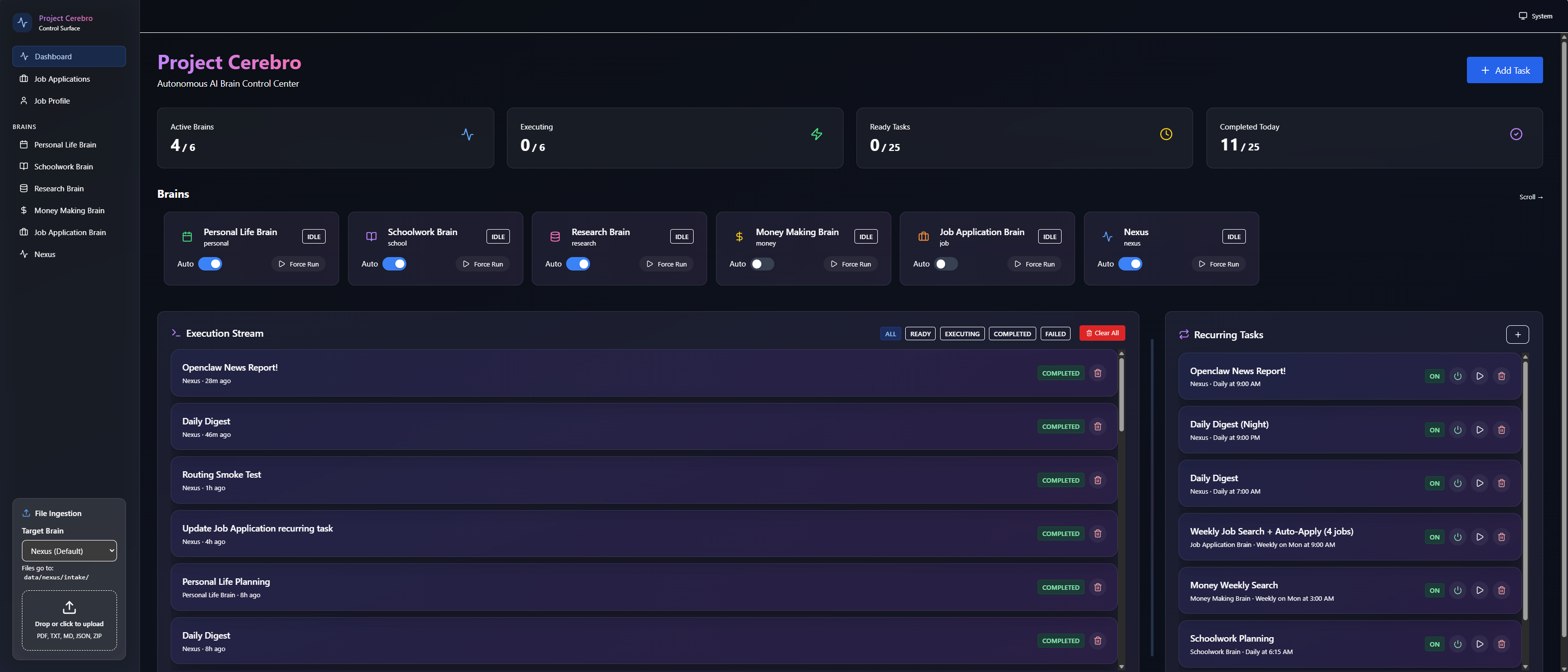
A highly modular, agent-friendly execution control surface for running multiple OpenClaw “brains” (agents) with:
- an Execution Stream (source of truth)
- Recurring Tasks that spawn instances into the stream
- per-brain Auto Mode + manual Run
- channel-agnostic notifications via OpenClaw messaging
What this is
Cerebro is a dashboard + runtime that helps you supervise a set of specialized agents (“brains”).
Core model
- Execution Stream = source of truth for everything that will run / has run.
- One-time tasks execute when you click Run or when the brain is in Auto Mode.
- Recurring tasks spawn exactly one instance into the Execution Stream when due and execute regardless of Auto Mode.
Brains
- A brain is a named scope + tool/context configuration bound to an OpenClaw agent id.
- Nexus is the default brain: general-purpose orchestration and “everything else.”
Install / Setup (high level)
See SETUP.md for full instructions.
Required secrets / env vars
OPENCLAW_GATEWAY_URL(e.g.ws://127.0.0.1:18789)OPENCLAW_TOKEN(OpenClaw Gateway token)
Quick outline:
- Clone repo + install deps
- Create
.envfrom.env.exampleand set the required OpenClaw vars above - Copy templates:
config/brains.template.json→config/brains.jsonconfig/brain_targets.template.json→config/brain_targets.json
- (Optional) seed examples:
npm run seed
Modularity (agent-friendly)
This repo is designed for agents to customize quickly:
- Add/remove brains by editing
config/brains.jsonandconfig/brain_targets.json. - Optional Job module: opt in/out by adding/removing the Job brain + pages (see
config/brains.jobs.addon.template.json). - Recurring tasks are templates under
config/seeds/.
Runtime behaviors (security transparency)
This package runs a local HTTP service (Fastify + React UI) and will:
- Expose a dashboard over HTTP on
PORT(default 3000) - Call the OpenClaw Gateway/CLI using the secrets you provide
- Send outbound messages using OpenClaw messaging to the per-brain
{channel,target}destinations - Accept file uploads via
POST /api/uploadand store them locally under./data//intake/
Notes
- No secrets or personal IDs are committed; local config/DB are gitignored.
- Notifications are routed through OpenClaw’s channel system (Discord/T@elegrimm/Signal/etc.).
- Optional modules (Job tracker/profile) are opt-in; if you don’t include the Job brain, the UI hides job pages.
相关推荐




专题
+ 收藏
+ 收藏
+ 收藏
+ 收藏
+ 收藏
+ 收藏
最新数据

相关文章
Minecraft 3D 建造计划生成器:AI 场景架构师 - Openclaw Skills
Scholar Search:自动化文献搜索与研究简报 - Openclaw Skills
issue-to-pr: 自动化 GitHub Issue 修复与 PR 生成 - Openclaw Skills
接班交班总结器:临床 EHR 自动化 - Openclaw Skills
Teacher AI 备课专家:K-12 自动化教案设计 - Openclaw Skills
专利权利要求映射器:生物技术与制药 IP 分析 - Openclaw Skills
生成 Tesla 车身改色膜:用于 3D 显示的 AI 图像生成 - Openclaw Skills
Taiwan MD:面向台湾的 AI 原生开放知识库 - Openclaw Skills
自学习与迭代演进:AI Agent 成长框架 - Openclaw Skills
HIPC Config Manager: 安全的 API 凭据处理器 - Openclaw Skills
AI精选

