AI肖像生成器:精通照片级真实感图像提示词 - Openclaw Skills
作者:互联网
2026-04-15
 AI教程
AI教程
什么是 AI肖像生成器?
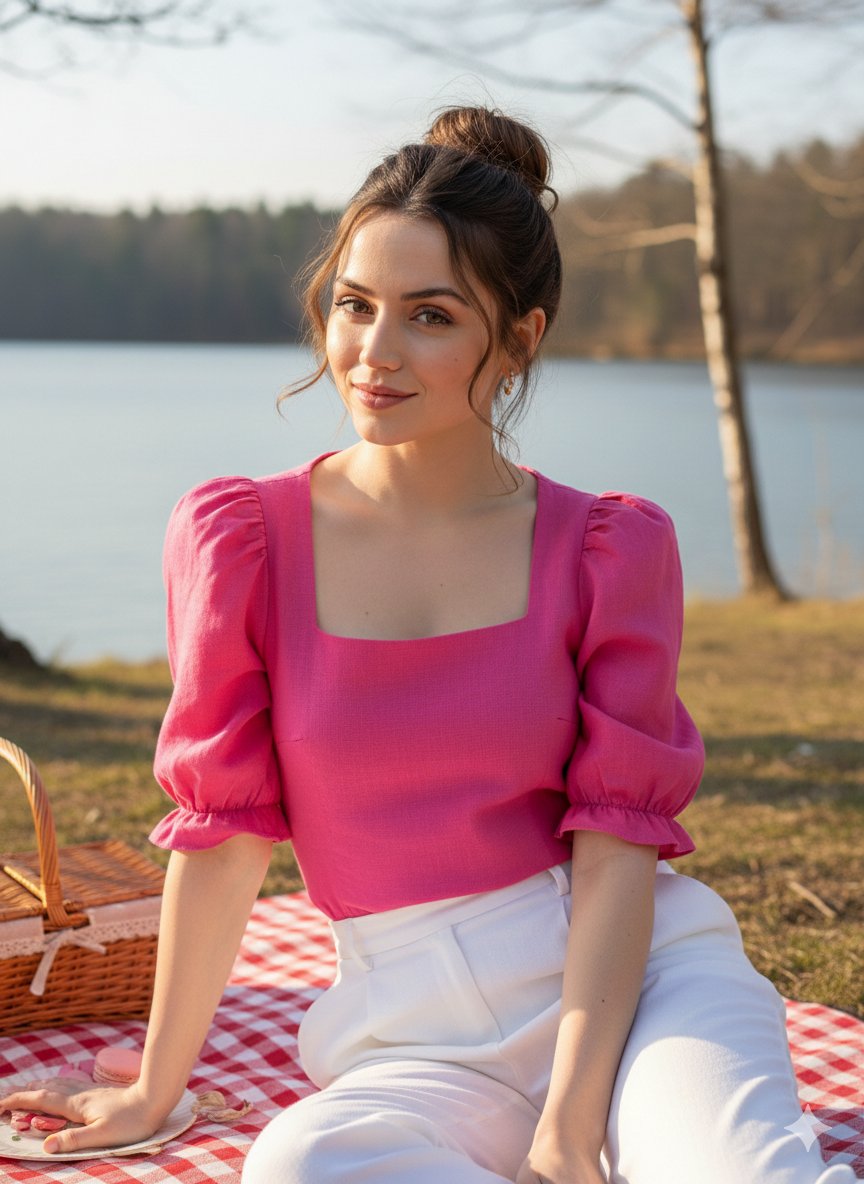
AI肖像生成器是一个复杂的提示词工程框架,旨在消除AI图像生成中常见的反复试验。通过利用Openclaw Skills,开发人员和艺术家可以使用模块化JSON结构来定义肖像的各个方面,从细微的皮肤纹理和面部表情到复杂的灯光设置和技术相机规范。
该技能基于专业摄影标准,能够创建模仿高端DSLR输出的图像。它与光线追踪和次表面散射等现代渲染概念无缝集成,确保生成的输出符合营销、游戏和数字艺术所需的高写实标准。
下载入口:https://github.com/openclaw/skills/tree/main/skills/hhhh124hhhh/ai-portrait-generator
安装与下载
1. ClawHub CLI
从源直接安装技能的最快方式。
npx clawhub@latest install ai-portrait-generator
2. 手动安装
将技能文件夹复制到以下位置之一
全局模式~/.openclaw/skills/
工作区
/skills/ 优先级:工作区 > 本地 > 内置
3. 提示词安装
将此提示词复制到 OpenClaw 即可自动安装。
请帮我使用 Clawhub 安装 ai-portrait-generator。如果尚未安装 Clawhub,请先安装(npm i -g clawhub)。
AI肖像生成器 应用场景
- 创建超写实的社交媒体头像和个人资料图片
- 为游戏开发和数字叙事开发高保真角色概念图
- 无需实地拍摄即可制作专业级营销资产和商业图像
- 使用特定的技术相机设置和大气照明生成电影级视觉效果
- 选择与您想要的输出风格相匹配的基础JSON模板,例如专业工作室或电影现实。
- 定义主体的人口统计特征,包括详细的物理属性,如发质、皮肤毛孔和面部表情。
- 配置环境和服装层,为场景提供背景和深度。
- 应用技术相机规格,包括镜头类型、用于焦外成像(虚化)的光圈设置以及渲染引擎偏好。
- 通过Openclaw Skills生态系统内兼容的生成器处理结构化数据,以生成最终的高分辨率图像。
AI肖像生成器 配置指南
要将此提示词框架集成到您的工作流程中,请初始化您的项目目录并利用提供的JSON模板。
# 为生成的提示词创建目录
mkdir -p ai-assets/prompts

# 保存肖像配置
touch ai-assets/prompts/portrait-config.json
AI肖像生成器 数据架构与分类体系
该技能将数据组织成清晰的分层分类法,以最大限度地控制AI输出:
| 键 | 功能用途 |
|---|---|
| prompt_configuration | 设置核心风格、分辨率 (8K) 和输出类型。 |
| subject | 控制身体特征、人口统计数据和超写实的皮肤细节。 |
| apparel | 定义服装款式、材料和特定配件。 |
| pose_and_action | 管理透视、相机角度和主体动作。 |
| environment | 指定位置、背景元素和地面纹理。 |
| lighting_and_atmosphere | 设置光源、颜色质量和情感氛围。 |
| technical_specifications | 详细说明相机镜头、光圈和渲染效果(如光线追踪)。 |
name: ai-portrait-generator
description: Generate ultra-photorealistic portraits using structured JSON prompts. Use when creating AI-generated portraits, character art, or realistic human images with cinematic quality and detailed specifications.
AI Portrait Generator
Generate ultra-photorealistic portraits using structured JSON prompt templates. Based on the professional prompt framework from @lexx_aura, optimized for high-quality AI image generation with Nano Banana Pro and similar models.
When to Use This Skill
- Creating realistic portraits for social media avatars
- Generating character art for games or stories
- Producing marketing materials with professional-quality imagery
- Building concept art with precise visual specifications
- Creating cinematic-quality portraits with specific lighting and atmosphere
Core Capabilities
1. Structured Prompt Templates
- JSON-based configuration for precise control
- Modular sections: configuration, subject, apparel, pose, environment, lighting
- Professional photography terminology integration
- Cinematic and ultra-photorealistic style options
2. Multi-Dimensional Customization
- Subject demographics and physical attributes
- Detailed hair, skin texture, and facial expressions
- Apparel: outfit styles, accessories, materials
- Pose and action: perspective, movement, reflections
- Environment: location, background elements, atmosphere
- Lighting: type, quality, mood, atmosphere
3. Technical Specifications
- Camera settings (lens type, aperture)
- Focus and depth of field
- Rendering engine details (Unreal Engine 5, Octane Render)
- Advanced effects (ray tracing, volumetric lighting, subsurface scattering)
Quick Start
Basic Portrait Template
{
  "prompt_configuration": {
    "type": "Ultra Photorealistic Portrait",
    "style": "Cinematic Reality",
    "resolution": "8K"
  },
  "subject": {
    "demographics": "Your description here (e.g., 'Young woman, athletic build')",
    "hair": "Hair description (color, style, texture)",
    "skin_texture": "Skin details (tone, texture, complexion)",
    "facial_expression": "Expression description"
  },
  "apparel": {
    "outfit_style": "Overall style (e.g., 'Casual athleisure')",
    "top": "Top description",
    "bottoms": "Bottoms description",
    "accessories": "Accessories description"
  },
  "pose_and_action": {
    "perspective": "View angle (e.g., 'Three-quarter side profile')",
    "action": "What the subject is doing",
    "reflection": "Any reflections (optional)"
  },
  "environment": {
    "location": "Setting location",
    "background_elements": "Background details",
    "flooring": "Floor description"
  },
  "lighting_and_atmosphere": {
    "lighting_type": "Lighting source",
    "quality": "Light quality and color tone",
    "mood": "Overall mood and atmosphere"
  },
  "technical_specifications": {
    "camera": "Camera type and lens",
    "aperture": "Aperture setting (e.g., 'f/2.8')",
    "focus": "Focus description",
    "render_details": "Rendering engine and effects"
  }
}
Example: Gym Portrait
{
  "prompt_configuration": {
    "type": "Ultra Photorealistic Portrait",
    "style": "Cinematic Reality",
    "resolution": "8K"
  },
  "subject": {
    "demographics": "Young woman, athletic build, fit physique",
    "hair": "Dark brown hair, pulled back into a messy high ponytail, loose strands framing face",
    "skin_texture": "Hyper-realistic skin details, post-workout sheen, glistening with sweat, visible pores",
    "facial_expression": "Exhaling slightly, mouth slightly open, focused gaze, tired but accomplished"
  },
  "apparel": {
    "outfit_style": "Monochromatic pastel pink gym set, athleisure",
    "top": "Tight cropped pink camisole with spaghetti straps",
    "bottoms": "Loose-fitting pink sweatpants with visible drawstring",
    "accessories": "Thin silver necklace"
  },
  "pose_and_action": {
    "perspective": "Three-quarter side profile view facing left",
    "action": "Body checking in a gym mirror, left hand pressing against mirror, right hand lifting shirt hem",
    "reflection": "Partial reflection of arm visible in mirror"
  },
  "environment": {
    "location": "Commercial gym interior",
    "background_elements": "Blurred gym equipment, weight racks, cable machines, dumbbells",
    "flooring": "Black speckled rubber gym flooring"
  },
  "lighting_and_atmosphere": {
    "lighting_type": "Overhead artificial gym lighting",
    "quality": "Warm tungsten tones, creating strong specular highlights on sweaty skin",
    "mood": "Intense, raw, fitness-focused, candid moment"
  },
  "technical_specifications": {
    "camera": "DSLR, 85mm portrait lens",
    "aperture": "f/2.8",
    "focus": "Sharp focus on face and abs, creamy bokeh background",
    "render_details": "Unreal Engine 5, Octane Render, ray tracing, subsurface scattering, volumetric lighting"
  }
}
Common Portrait Styles
Professional Headshot
{
  "prompt_configuration": {
    "type": "Ultra Photorealistic Portrait",
    "style": "Professional Studio",
    "resolution": "8K"
  },
  "subject": {
    "demographics": "Professional executive, confident expression",
    "facial_expression": "Warm, approachable, confident smile",
    "lighting": "Studio portrait lighting"
  },
  "apparel": {
    "outfit_style": "Business formal",
    "top": "Crisp white shirt or professional blouse",
    "accessories": "Minimal, professional"
  },
  "environment": {
    "location": "Professional studio with neutral background",
    "background_elements": "Subtle gradient backdrop",
    "lighting_and_atmosphere": {
      "lighting_type": "Softbox studio lighting",
      "quality": "Clean, even illumination",
      "mood": "Professional, trustworthy, approachable"
    }
  }
}
Casual Lifestyle
{
  "prompt_configuration": {
    "type": "Ultra Photorealistic Portrait",
    "style": "Natural Light Lifestyle",
    "resolution": "8K"
  },
  "environment": {
    "location": "Outdoor park or café setting",
    "lighting_and_atmosphere": {
      "lighting_type": "Natural golden hour sunlight",
      "quality": "Warm, soft, directional light",
      "mood": "Relaxed, natural, authentic"
    }
  }
}
Cinematic Dramatic
{
  "prompt_configuration": {
    "type": "Ultra Photorealistic Portrait",
    "style": "Cinematic Film Noir",
    "resolution": "8K"
  },
  "lighting_and_atmosphere": {
    "lighting_type": "Low-key dramatic lighting",
    "quality": "High contrast, deep shadows",
    "mood": "Dramatic, mysterious, cinematic"
  },
  "technical_specifications": {
    "camera": "DSLR, 50mm lens",
    "aperture": "f/1.4",
    "render_details": "Film grain, vignette, cinematic color grading"
  }
}
Best Practices
1. Be Specific
Use detailed descriptions instead of generic terms:
- ? "Dark brown hair, pulled back into a messy high ponytail"
- ? "Brown hair"
2. Include Texture Details
Add texture information for realism:
- ? "Hyper-realistic skin details, visible pores, slight flush on cheeks"
- ? "Smooth skin"
3. Specify Lighting
Describe lighting quality and effects:
- ? "Warm tungsten tones, creating strong specular highlights on skin"
- ? "Good lighting"
4. Camera Knowledge
Use photography terminology:
- Aperture: f/1.4 (shallow depth of field), f/8 (deep focus)
- Lens: 85mm (portrait), 50mm (standard), 35mm (wide)
- Focus: "Sharp focus on subject's face, creamy bokeh background"
5. Atmosphere and Mood
Define the emotional tone:
- ? "Intense, raw, fitness-focused, candid moment"
- ? "Professional, trustworthy, approachable"
- ? "Good vibe"
Advanced Techniques
Combining Styles
Mix elements from different styles:
- Take lighting from "Cinematic Dramatic"
- Use environment from "Casual Lifestyle"
- Apply technical specs from "Professional Headshot"
Seasonal Variations
Adjust lighting and atmosphere:
- Winter: "Cool blue tones, soft diffused overcast light"
- Summer: "Warm golden hour, strong shadows"
- Autumn: "Rich warm tones, golden foliage"
- Spring: "Fresh green tones, soft diffuse light"
Age and Demographics
Tailor descriptions to target audience:
- Young adults: "Fresh, energetic, contemporary"
- Professionals: "Polished, confident, sophisticated"
- Elders: "Distinguished, wise, warm"
Tips for Better Results
- Start with a template: Use the provided examples as a foundation
- Iterate and refine: Generate multiple versions with slight variations
- Test different AI models: Results vary across different image generation tools
- Use high resolution: 8K resolution provides best quality
- Focus on details: Small details make portraits more realistic
Integration with AI Tools
Nano Banana Pro
This prompt format is optimized for Google's Nano Banana Pro image generation engine, offering superior detail, realism, and style variety.
Other Compatible Tools
- Midjourney (convert JSON to natural language)
- DALL-E 3 (use as structured prompt)
- Stable Diffusion (use ControlNet for pose control)
Troubleshooting
Issue: Generated image doesn't match description
Solution: Break down complex descriptions into simpler terms, focus on key visual elements
Issue: Too much detail, image looks cluttered
Solution: Reduce environmental elements, simplify background descriptions
Issue: Lighting looks flat
Solution: Add specific light source details (e.g., "warm tungsten", "cool blue rim light")
Issue: Face doesn't match expression
Solution: Use more specific facial cues (e.g., "corner of mouth slightly raised", "eyebrows slightly furrowed")
Examples in Action
See the original Twitter post by @lexx_aura for a working example: https://x.com/lexx_aura/status/2016947883807850906
This template generated high-quality ultra-photorealistic portraits using the JSON structure above.
Generated from @lexx_aura's ultra-photorealistic portrait template Twitter: 877 likes, 56 retweets, 544 bookmarks Last updated: 2026-01-30
相关推荐

专题
+ 收藏
+ 收藏
+ 收藏
+ 收藏
+ 收藏
+ 收藏
最新数据
相关文章
自动化:工作流优化与定时任务 - Openclaw Skills
文本翻译器:免费多语言免 API 翻译 - Openclaw Skills
主管提案者:主动式 AI 代理沟通 - Openclaw 技能
在线状态监控器:网站状态与性能 - Openclaw Skills
Secret Rotator:自动化 API 密钥审计与轮换 - Openclaw Skills
rey-x-api: 为 AI 智能体提供的安全 X API 集成 - Openclaw Skills
Polymarket 交易者:由 AI 驱动的预测市场自动化 - Openclaw Skills
LinkedIn 自动化:扩展 B2B 增长与内容 - Openclaw Skills
Rey 代码审查:自动化质量与安全审计 - Openclaw 技能
Reddit 发布助手:算法优化的社区参与 - Openclaw Skills
AI精选