如何在 Outlook 启动时自动打开多个窗口?
作者:互联网
2026-04-08
 其他
其他
当您启动 Outlook 账户时,通常只会打开邮件窗口。那么,有没有办法让 Outlook 在启动时自动同时打开其他窗口,比如邮件、日历、联系人和任务窗口?
使用 VBA 代码在 Outlook 启动时自动打开多个 Outlook 窗口
使用 VBA 代码在 Outlook 启动时自动打开多个 Outlook 窗口
这里为您推荐一段 VBA 代码,助您在启动 Outlook 时,第一时间自动打开多个窗口,包括邮件、日历、联系人和任务窗口。操作方法如下:
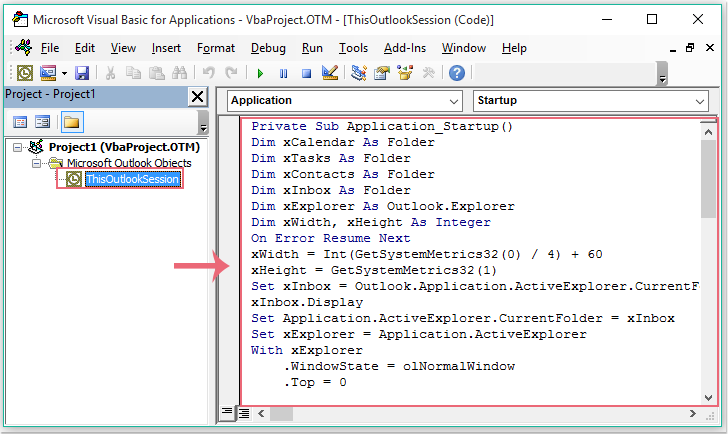
1. 按住 ALT + F11 键,即可打开 Microsoft Visual Basic for Applications 窗口。
2. 在 Microsoft Visual Basic for Applications 窗口中,双击 Project 1(VbaProject.OTM) 窗格中的 ThisOutlookSession,打开该模块,然后将以下代码复制并粘贴到空白模块中。
VBA 代码:在 Outlook 启动时自动打开多个 Outlook 窗口:
Private Sub Application_Startup()
Dim xCalendar As Folder
Dim xTasks As Folder
Dim xContacts As Folder
Dim xInbox As Folder
Dim xExplorer As Outlook.Explorer
Dim xWidth, xHeight As Integer
On Error Resume Next
xWidth = Int(GetSystemMetrics32(0) / 4) + 60
xHeight = GetSystemMetrics32(1)
Set xInbox = Outlook.Application.ActiveExplorer.CurrentFolder
xInbox.Display
Set Application.ActiveExplorer.CurrentFolder = xInbox
Set xExplorer = Application.ActiveExplorer
With xExplorer
    .WindowState = olNormalWindow
    .Top = 0
    .Left = 0
    .Height = xHeight
    .Width = xWidth
End With
Set xCalendar = Outlook.Session.GetDefaultFolder(olFolderCalendar)
xCalendar.Display
Set xExplorer = Application.ActiveExplorer
With xExplorer
    .WindowState = olNormalWindow
    .Top = 0
   .Left = xWidth
    .Height = xHeight
    .Width = xWidth
End With
Set xContacts = Outlook.Session.GetDefaultFolder(olFolderContacts)
xContacts.Display
Set xExplorer = Application.ActiveExplorer
With xExplorer
    .WindowState = olNormalWindow
    .Top = 0
    .Left = xWidth * 2
    .Height = xHeight
    .Width = xWidth
End With
Set xTasks = Outlook.Session.GetDefaultFolder(olFolderTasks)
xTasks.Display
Set xExplorer = Application.ActiveExplorer
With xExplorer
    .WindowState = olNormalWindow
    .Top = 0
    .Left = xWidth * 3
    .Height = xHeight
    .Width = xWidth
End With
End Sub
3. 接着点击插入 > 模块,然后将以下代码复制并粘贴到刚刚打开的空白模块中,详见截图:
Declare Function GetSystemMetrics32 Lib "user32" Alias "GetSystemMetrics" (ByVal xIndex As Long) As Long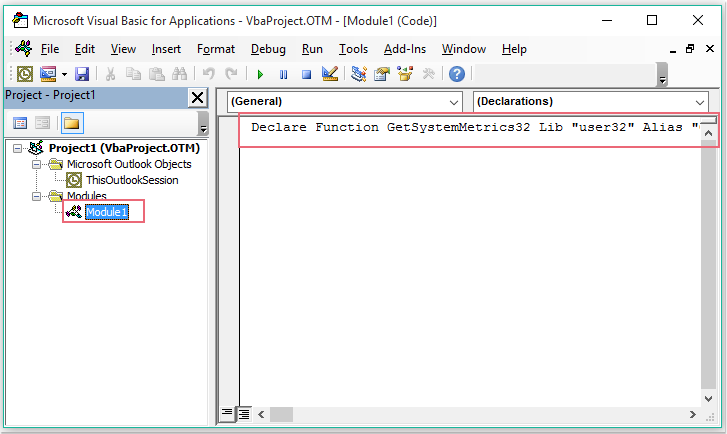
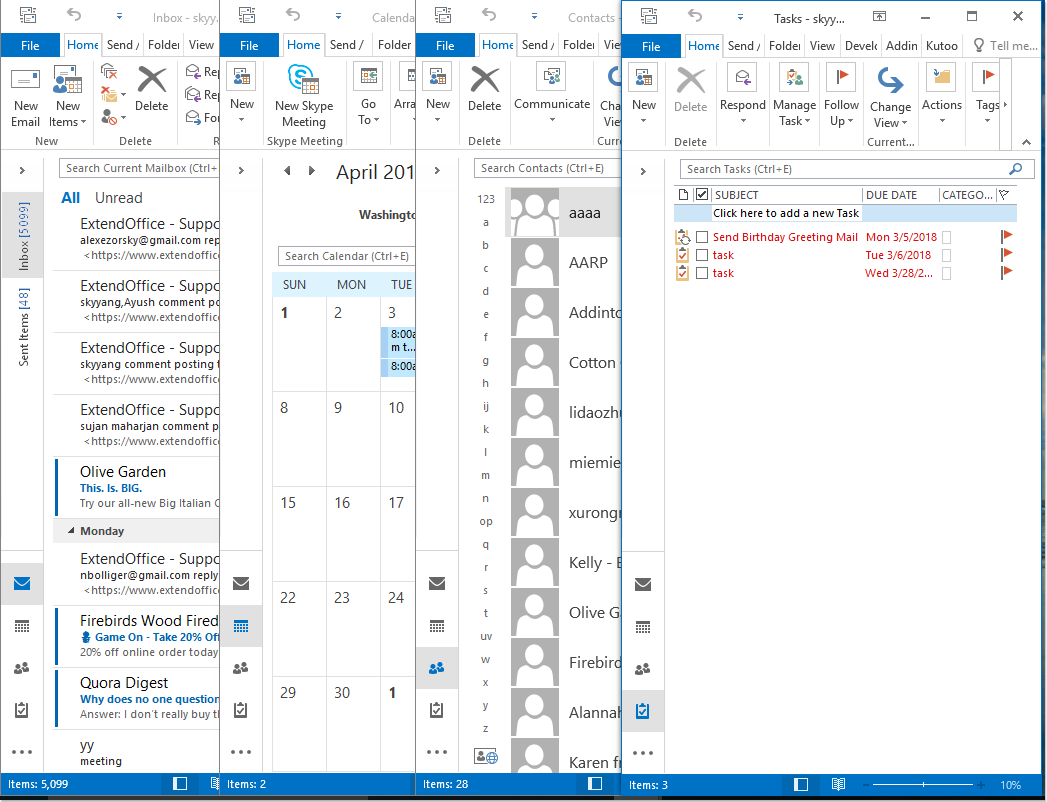
4. 保存并关闭代码后,重启 Outlook 即可使代码生效。现在,每次打开 Outlook 时,邮件、日历、联系人和任务窗口都会自动并排打开,如下图所示:
相关标签:
相关推荐
专题
+ 收藏
+ 收藏
+ 收藏
+ 收藏
+ 收藏
+ 收藏
最新数据
相关文章
office-quotes:生成《办公室》(美版)语录 - Openclaw Skills
office-xyz: AI 智能体协作虚拟办公室 - Openclaw Skills
办公自动化助手:自动化报告与会议纪要 - Openclaw Skills
工作技能:精通办公室动态与沟通 - Openclaw Skills
在 Outlook 中创建、编辑、使用和共享联系人组
如何在 Outlook 邮件中将图片另存为 JPEG、JPG 或 PNG 格式?
如何在 Outlook 中重命名便笺?
如何在 Outlook 中转发联系人组(通讯组列表)?
如何在 Outlook 中按照删除日期对已删除邮件进行排序?
如何在 Outlook 的邮件窗口中删除收件人(收件人)字段?
AI精选